Screen annotation for Windows. Draw. Highlight. Zoom. One shortcut
Pen, highlighter, arrows, shapes and text over any app, with a cursor highlighter, zoom and on-screen keystrokes.
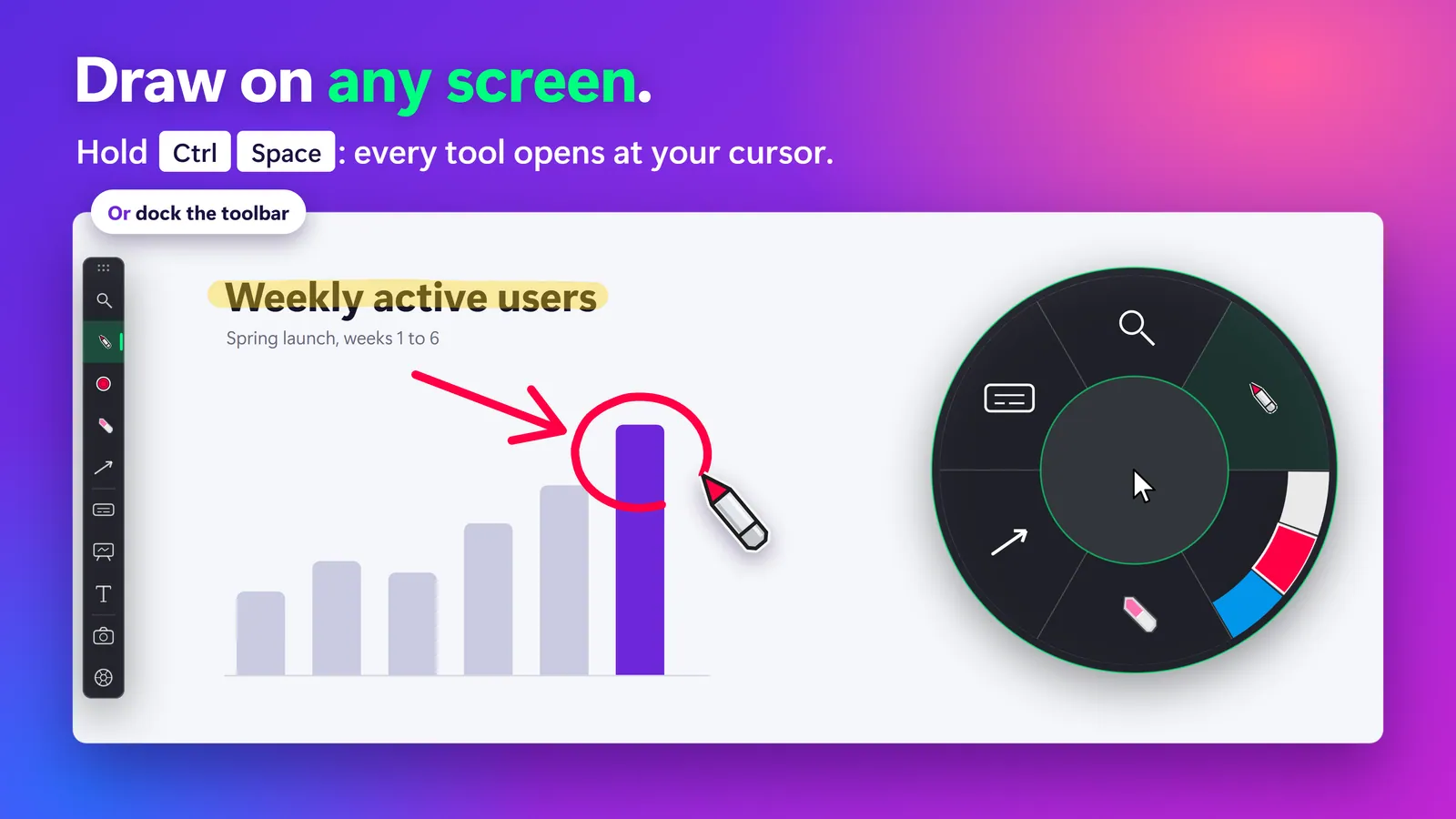
Hold Ctrl + Space — same tools, at your pointer. Click one to see it work.
Why Screen Sharing on Windows Still Feels Broken
- Your cursor disappears in a sea of Apps – nobody in the room can follow it
- Keystrokes are important – but nobody sees you type Ctrl+Shift+V
- Your magnifier is a separate app that fights your annotation tool
- Switching tools mid-presentation kills your flow and your credibility
SHARA puts all of this in one toolbar, and behind one hotkey.
A toolbar when you want it.
A Wheel when you don’t.
A halo that is always on, then six tools, the same ones docked at the edge of your screen or at your pointer when you hold Ctrl+Space.
- Cursor highlighter
Everyone finds your cursor
A halo follows your pointer in the shape, size, color and line you choose, from a small dotted circle to an extra-large squircle. Clicks flash, ripple or tilt it, and the lens and spotlight build on it.
- Halo Free
- Circle, squircle, rhombus Free
- Five sizes Free
- Click flash Free
- Dashed and dotted Pro
- Glow Pro
- Ripple and click colors Pro
- Click tilt Pro
- Lens engine
Bring the detail to the room
Magnify what you are pointing at, dim everything else, zoom the whole screen live, or send a vertical 9:16 window to OBS.
- Lens Pro
- Spotlight Pro
- Live Zoom Pro
- Broadcast 9:16 Pro
- Annotation
Draw on any app
A laser pointer with a fading trail, a freehand pen and a translucent highlighter, over whatever is on screen. No watermark and no stroke limit.
- Laser Free
- Pen Free
- Highlighter Pro
- Ink colors
Change ink without stopping
Your colors sit on the Wheel as swatches. Click one and the next stroke is that color. Keep a set for light slides and another for dark ones.
- One saved color per tool Free
- Color sets Pro
- Eraser
Take a mark back
Wipe a single stroke where you point, clear everything you drew in one move, or hide your ink and bring it back, with the slide or the app underneath untouched.
- A stroke Free
- Everything Free
- Hide ink Free
- Shapes
Straight lines, clean shapes
Drag out a line, a rectangle, a circle or an arrow and it lands clean, so a diagram on a live call looks drawn on purpose.
- Arrow Free
- Line Pro
- Rectangle Pro
- Circle Pro
- On your screen
Show keys, open a board, add text
Show every shortcut you press, with keystrokes hidden in password fields. The same slice opens a whiteboard and places typed text labels.
- Text labels Free
- Keystrokes Pro
- Whiteboard Pro
More from SHARA
Tailored for How You Present
Different apps, different audiences. Same instant Ctrl+Space tools.
Teaching Code, 3D & Pro Apps
Make silent shortcuts, 16px icons, and mouse clicks impossible to miss on complex UI layouts.
Leading Calls & Client Demos
Keep attention locked on your screen share with high-contrast pointers that work identically in Zoom, Teams, and Meet.
Recording Lessons & Shorts
Capture smooth zooms, clicks, and keypresses directly in the recording take. Eliminate hours of post-production editing.
Teaching Over Slides & PDFs
Walk through lessons with smooth digital chalk that draws over any document, or open a whiteboard over your desktop. No sign-in.
The best Epic Pen alternative
replaces 4 apps with one
Everything your existing tools do — and everything they can’t.
| What you need | Without SHARA | With SHARA ✦ |
|---|---|---|
| Cursor Highlighter | PowerToys — circles only, no physics | ✓ 3 shapes · 3D tilt · click colors · glow |
| Screen Magnifier | ZoomIt — basic, no annotation sync | ✓ 4 modes: Magnifier · Spotlight · Zoom · 9:16 |
| Keystroke Visualizer | Carnac — abandoned, no privacy mode | ✓ 6-mode engine · auto password hiding |
| Screen Drawing | Epic Pen — Pro uses a recurring subscription | ✓ Laser · Pen · Highlighter · Eraser · Shapes · Text |
| Whiteboard | One more app to open and share | ✓ White, black or grid board over your desktop |
| Tool Switching | Alt-Tab between 4 separate apps | ✓ One docked toolbar, or the Ctrl+Space Wheel |
| OBS Vertical Feed | Manual crop + external layout | ✓ Built-in Broadcast Mode, 9:16 window layout |
| Total cost | $35+ across 4 apps with conflicts | Free forever · optional Pro $19.99 once |
Trusted by Professionals Who Present Live
The “halo” lens tool is something I’ve always wanted. I don’t even need to wear my reading glasses anymore, as I can read small text on my 4K monitor effortlessly. … The SHARA Wheel menu is super intuitive and makes switching tools on the fly effortless. … It was worth every penny.
Shara’s radial wheel is absolutely genius. … it really does feel like the ultimate one stop shop for teachers and presenters. What impressed me most is the developer. I shared detailed feedback over several weeks, and many suggestions were implemented within days.
SHARA has earned a permanent place in my training toolkit — the exceptionally smooth and clear writing, even at very small sizes, and the brilliant Ctrl+Space workflow that puts every tool right where my mouse is make live annotation remarkably effortless without having to memorize a long list of shortcuts, letting me focus on teaching rather than managing the tool.
- ✓Toolbar + SHARA Wheel (Ctrl+Space)
- ✓Pen, Laser pointer, Eraser & Arrow
- ✓Text labels & screenshots
- ✓Cursor halo & click cues
- ✓Multi-monitor & 4K display calibrated
- ✓No watermark · No account · No ads
- ✓Everything in Free included forever
- ✓Magnifier, Spotlight & Live Zoom
- ✓Highlighter, Line, Rectangle & Circle
- ✓Whiteboard: white, black or grid
- ✓On-screen Keystrokes & privacy shield
- ✓Color sets, halo glow & click effects
- ✓9:16 Vertical Broadcast window for OBS / Reels