Screenbrush for Windows: a free alternative that draws over any app
Screenbrush is a Mac app: its App Store listing says “Only for Mac”, and its developer’s site links only to App Store pages. On Windows, SHARA draws over any app with a free laser, pen, arrow and text labels, and its cursor halo flashes on every click. Here is where each one wins.
- You are on Windows 10 or 11. Screenbrush has no Windows version that we could verify. SHARA installs from the Microsoft Store.
- You want the basics free. Laser, Pen, Arrow, text labels and an Eraser never expire, and Undo and Clear All are free too.
- You show where you click. The cursor halo and its click flash are free.
- You zoom on small print. Lens, Spotlight and Live Zoom are in the 14-day trial.
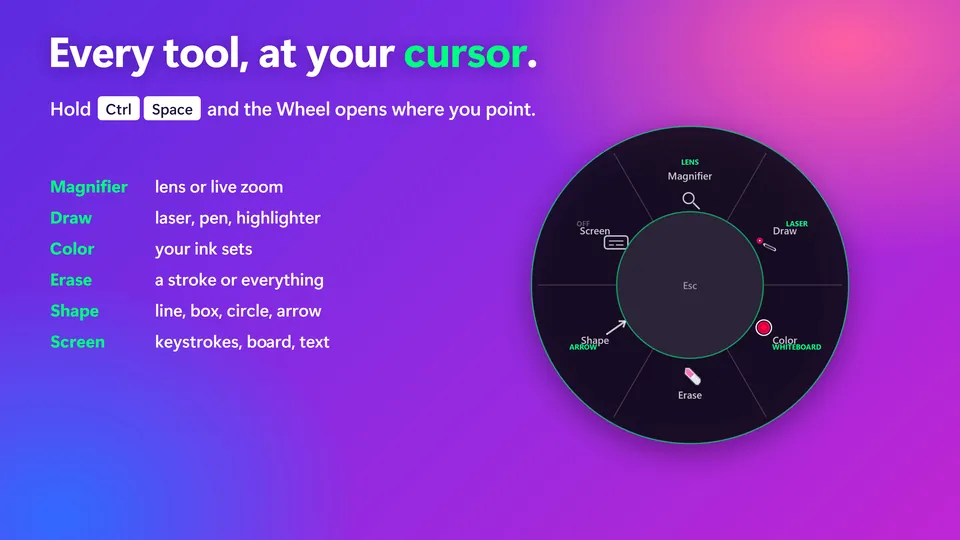
Free forever: cursor halo, click animation, Pen, Laser, Arrow, Text, Eraser, Screenshot and the Ctrl+Space Wheel. Every Pro tool is free for your first 14 days, with no card and no account. After that, Pro is a one-time purchase ($19.99 in the US).
- •You use a Mac. SHARA is Windows only. Microsoft’s ZoomIt page also lists a ZoomIt for Mac on GitHub.
- •You want a phone as your clicker. Screenbrush’s listing describes a remote clicker for Keynote and PowerPoint, with a companion iOS app. SHARA’s feature list has no phone remote.
- •You want lower-third titles. Screenbrush lists a lower-third title tool. SHARA’s feature list has none.
Updated November 1, 2026
Screenbrush vs SHARA: the rows that change the decision
Rows where both just draw on the screen are left out. Where Screenbrush’s listing is silent, the cell says “not listed”.
| What decides it | Screenbrush | SHARA |
|---|---|---|
| Runs on | macOS 10.11 or later. The listing says “Only for Mac” | Windows 10 and 11 |
| Price model | Free with in-app purchases. ScreenBrush Plus is $6.99 (US store), with a 7-day trial | Free tier. Pro $19.99 once (US), 14-day money-back guarantee |
| Laser pointer | ✓Laser-pointer mode | ✓Laser FREE, fades after 2.6 seconds |
| Pen and eraser | ✓Drawing over the screen; undo and redo are in Plus | ✓Pen, Eraser, Undo, Clear All FREE |
| Arrow, text, shapes | Arrow, line, rectangle, ellipse and text are in Plus | Arrow and text FREE; Line, Rectangle, Circle PRO |
| Whiteboard | ✓Whiteboard overlay | ✓White, black or grid board PRO |
| Zoom and spotlight | Flashlight and magnifying tools | ✓Lens, Spotlight, Live Zoom up to 8×, Broadcast PRO |
| Click cue | Not listed | ✓Halo with click flash FREE; custom click colours PRO |
| Keystroke display | Not listed | ✓Keystroke Pill, pauses in password fields PRO |
| Phone remote | Companion iOS app, ScreenBrush Remote | ✕Not offered |
| Latest release | Version 1.9.3, November 13, 2024 | Version 4.3.3, Store update October 22, 2026 |
Try SHARA on your own Windows PC. The free tier never expires, and every install starts with a 14-day Pro trial.
Three things to know about Screenbrush on Windows
There is no official Screenbrush for Windows
The App Store listing says “Only for Mac”, and the developer’s site links only to App Store pages. Download sites do list Windows files: a German site hosts a 2011 version 1.3.1 for Windows XP to 7 that it says the maker no longer offers, and others show version 1.9.3 for Windows 11. We could not verify any of them, so we do not link them.
Proof: the Mac App Store listing and the heise download page.
The draw-over-any-app basics are free
Laser, Pen, Arrow, text labels, Eraser, Undo and Clear All are in SHARA’s free tier. Screenbrush keeps arrows, text and undo in its paid Plus. The Highlighter and Line, Rectangle and Circle shapes are SHARA Pro.
Proof: press Ctrl+Space and pick Draw on the Wheel.
No phone remote, no lower thirds
Screenbrush’s listing describes a remote clicker, a companion iOS app and a lower-third title tool. SHARA does not have those. It is also Windows only, so a mixed Mac and Windows team needs a second tool on the Mac.
Proof: the Screenbrush listing’s feature text, read November 1, 2026.
Free screen-drawing tools on Windows, side by side
If SHARA is not the one, these are the common choices. Each has its own page on the sites linked in the caption.
| What decides it | ZoomIt | Epic Pen | SHARA |
|---|---|---|---|
| Price model | Free, from Microsoft (Sysinternals and PowerToys) | Basic free, no time limit or watermark. Pro is a subscription, billed monthly or yearly, with a 14-day trial; no lifetime option is listed | Free tier. Pro $19.99 once (US) |
| How you draw | Press a hotkey, then draw on the live screen (Ctrl+2) or on a zoomed still (Ctrl+1). Hotkeys are customisable | Floating toolbar over your apps; pen, highlighter and eraser in Basic | Docked toolbar or the Ctrl+Space Wheel; Laser, Pen, Arrow, Text free |
| Zoom | Still zoom, plus LiveZoom (Ctrl+4) | Not listed | Lens, Spotlight, Live Zoom PRO |
| Click cue | Not listed | Highlighted cursor is listed under Pro | Halo with click flash FREE |
| Best for | A quick zoom and sketch with nothing to install | Handwriting with a pen or touch (pressure and multi-touch are listed) | Presenting and teaching: halo, laser and zoom together |
| Watch out | Driven by hotkeys, so you learn the keys | Basic shows occasional in-app promotions; one Pro licence covers one Windows device | No pen pressure; strokes have a fixed thickness |
Comparing all of them? See SHARA vs ZoomIt, SHARA vs Epic Pen, the best screen annotation software for Windows roundup, or the guide to drawing on screen in Windows 11.
Draw over your screen in three steps
There is nothing to import from Screenbrush: both tools only put ink on the screen.
- Install SHARA free from the Microsoft Store.The cursor halo is on at first launch. Every Pro tool is free for 14 days, so you can try the Whiteboard and shapes on a real session.
- Hold Ctrl+Space and pick Draw.The Wheel opens where you point. Choose Laser or Pen. Ctrl+Win+X opens Draw from the keyboard. Every hotkey can be changed in Settings if one clashes with another app.
- Clear it and carry on.The Laser trail fades by itself after 2.6 seconds. Ctrl+Win+B clears the Pen, and Ctrl+Win+Z switches all of SHARA off.
Screenbrush on Windows, answered
Is there a Screenbrush for Windows?
What is the best free Screenbrush alternative for Windows?
Is SHARA free?
Is Screen Brush Pro the same app as Screenbrush?
Does SHARA have a laser pointer like Screenbrush?
Will people in Zoom or Teams see SHARA’s ink?
Draw over any app on Windows, free.
Halo, laser, pen, arrow and text labels free forever. Zoom, Highlighter, shapes, whiteboard and the Keystroke Pill are Pro, free for your first 14 days.
Disclosure and methodology: Mashyo makes SHARA. Screenbrush facts come from its Mac App Store listings (US store) and screenbrush.imagestudiopro.com, ZoomIt facts from Microsoft Learn, and Epic Pen facts from epicpen.com/pricing, all read November 1, 2026. Where a source does not say, we write “not listed” rather than assume. Prices change, so check each site before you buy. Last updated: November 1, 2026.