What is SHARA?
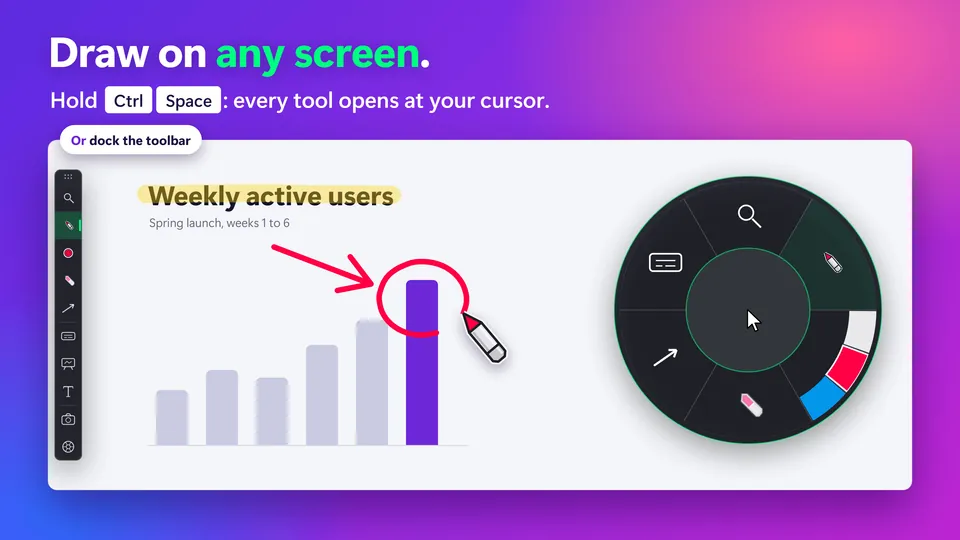
SHARA is a Windows 10 and 11 app, free to install, that puts a cursor halo, drawing tools, screen zoom and a keystroke display on top of whatever is on your screen. Every tool opens from a docked toolbar or from the Ctrl+Space Wheel, so you can point, draw and magnify while you present, teach or record.
SHARA at a glance#
| Fact | Detail |
|---|---|
| What it is | A presentation overlay for Windows: a cursor halo, screen annotation, screen zoom and a keystroke display. |
| Platform | Windows 10 (version 2004 or later) and Windows 11. English only. No Mac or Linux version. |
| Where to get it | Microsoft Store, product ID 9NSBK9J07HS4. Install steps. |
| How you open the tools | Hold Ctrl+Space for the Wheel at your cursor, or dock the toolbar to any screen edge. Ctrl+Win+A switches between them. |
| Free forever | Cursor halo with a click flash, the Wheel and toolbar, Laser, Pen, Arrow, Text, Eraser, Undo, Clear, Hide ink and Screenshot. |
| 14-day trial | Every Pro tool is free for 14 days from your first launch, with no card and no account. Then SHARA returns to the free tools and keeps your settings. |
| Pro tools | Magnifier, Highlighter, Line, Rectangle and Circle, the Keystroke Pill, Whiteboard and colour sets. One-time purchase, $19.99 in the US, no subscription. |
| Privacy | No account, telemetry, analytics or ads. It runs on your PC, online or offline. The only network use is for Pro: a price check (at most daily until you own Pro), checkout and restore. |
| What viewers see | When you share or record your entire screen, viewers see the halo and your ink. A single-window share may leave the overlay out: here is why. |
| Maker | Mohamed Fakhry, founder of SHARA. About the maker. |
| Version | 4.3.3, updated on the Microsoft Store on October 22, 2026. First released there on February 3, 2026. |
What SHARA does#
- Cursor halo. Follows your pointer from the first launch. Halo settings.
- Drawing over any app. Laser, Pen, Arrow, Text and Eraser. Draw tools.
- Zoom. Lens, Spotlight and Live Zoom up to 8×. Magnifier.
- Keys on screen. Shortcuts as you press them, paused in password fields. Keystroke pill.
- Board and screenshots. A Whiteboard and a Screenshot that includes your ink.
Try it in five steps#
- Install SHARA from the Microsoft Store.Your 14 days of every Pro tool start at first launch.
- Move your mouse.The cursor halo is on from the first launch, in the Squircle shape.
- Hold Ctrl+Space.The Wheel opens at your cursor with six slices: Magnifier, Draw, Color, Erase, Shape and Screen. With a Chinese input language installed, use Ctrl+Alt+Space.
- Press Ctrl+Win+A to switch to the docked toolbar.It sits on any screen edge and holds the same tools.
- Press Ctrl+Win+Z to turn all of SHARA off or on.The same keys turn it back on.
Free to install. The free tools never expire.
Download free fromView onMicrosoft StoreFree forever: cursor halo, click animation, Pen, Laser, Arrow, Text, Eraser, Screenshot and the Ctrl+Space Wheel. Every Pro tool is free for your first 14 days, with no card and no account. After that, Pro is a one-time purchase ($19.99 in the US). See pricing and the 14-day trial →
What SHARA does not do#
- •It does not record video. SHARA draws over your screen and takes screenshots. To keep a session, record it with OBS, Teams or Zoom.
- •It is Windows only. No Mac, Linux or mobile version.
- •It does not read pen pressure. Pen tablets work, but line width does not follow pressure.
Questions about SHARA#
Is SHARA free?
Does SHARA record my screen?
Will viewers on Zoom or Teams see my drawing?
Is SHARA open source or on GitHub?
If it doesn’t work
SHARA needs Windows 10 version 2004 or later. If the Microsoft Store won’t install it, see install blocked. If viewers can’t see your drawing, read viewers can’t see ink. For licensing and support questions, the SHARA FAQ has the short answers.
More in Getting started: Wheel and toolbar · Free trial and Pro · Update and uninstall.