What is SHARA?
SHARA is a Windows 10 and 11 app, free to install, that puts a cursor halo, drawing tools, screen zoom and a keystroke display on top of whatever is on your screen. Every tool opens from a docked toolbar or from the Ctrl+Space Wheel, so you can point, draw and magnify while you present, teach or record.
Quick path
- Install SHARA free from the Microsoft Store, on Windows 10 or Windows 11.
- A toolbar sits on the left edge of your screen and a green halo rings your pointer.
- Pick a tool and draw over any app, or hold Ctrl+Space for the Wheel.
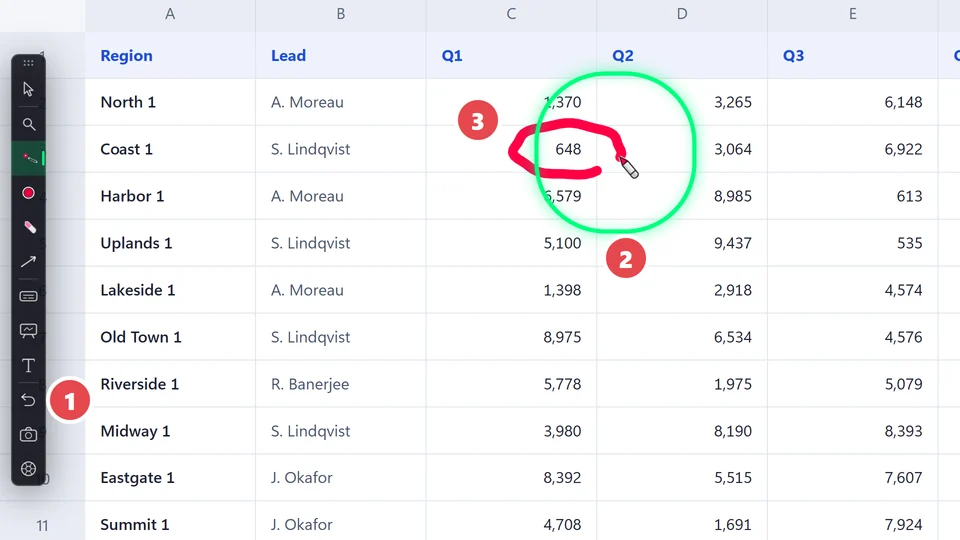 Halo on · default
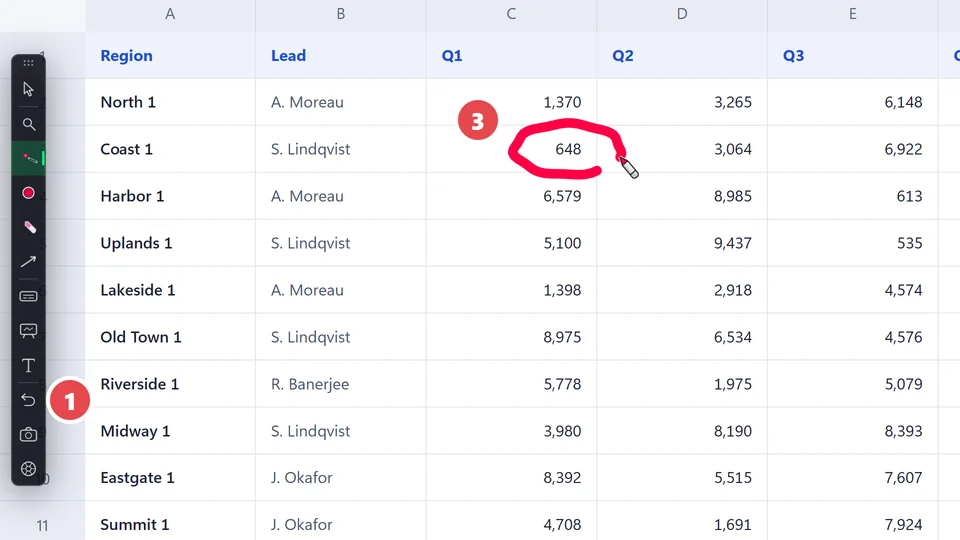 Halo off · Ctrl+Win+H
Left: the halo SHARA shows by default (1 toolbar, 2 halo, 3 pen circle).
Right: after Ctrl+Win+H the halo is gone and the toolbar and ink stay.
The halo is optional: hide or change it. An illustration on a made-up spreadsheet: the toolbar, halo and pen cursor are drawn from SHARA’s own code and colours.
SHARA at a glance#
| Fact | Detail |
|---|---|
| What it is | A presentation overlay for Windows: a cursor halo, screen annotation, screen zoom and a keystroke display. It draws on the screen itself, above whatever app is open. |
| Platform | Windows 10 (version 2004 or later) and Windows 11, on x64 and Arm64 PCs. English only. No Mac or Linux version. |
| Where to get it | Microsoft Store, product ID 9NSBK9J07HS4. Install steps. |
| How you open the tools | A toolbar docked to the left edge of the screen (it can sit on any edge), or hold Ctrl+Space for the Wheel at your pointer. Ctrl+Win+A switches between them (how the Wheel and toolbar work). |
| Free forever | Cursor halo with a click flash (optional: it can be turned off), the Wheel and toolbar, Laser, Pen, Arrow, Text, Eraser, Undo, Clear, Hide ink and Screenshot. |
| 14-day trial | Every Pro tool is free for 14 days from your first launch, with no card and no account. Then SHARA returns to the free tools and keeps your settings. |
| Pro tools | Magnifier, Highlighter, Line, Rectangle and Circle, the Keystroke Pill, Whiteboard, colour sets, and the halo glow and click ripple effects. One-time purchase, $19.99 in the US, no subscription. |
| Privacy | No account, telemetry, analytics or ads. It runs on your PC, online or offline. The only network use is for Pro: a price check (at most daily until you own Pro), checkout and restore. |
| What viewers see | When you share or record your entire screen, viewers see the halo and your ink. A single-window share may leave the overlay out: here is why. |
| Maker | Mohamed Fakhry, founder of SHARA. About the maker. |
| Released | First released on the Microsoft Store on February 3, 2026. |
What SHARA does#
- Cursor halo. Follows your pointer from the first launch and flashes on a click. Halo settings.
- Drawing over any app. Laser, Pen, Arrow, Text and Eraser. Draw tools.
- Zoom. Lens, Spotlight and Live Zoom up to 8×. Magnifier.
- Keys on screen. Shortcuts as you press them, paused in password fields. Keystroke pill.
- Board and screenshots. A Whiteboard and a Screenshot that includes your ink.
Try it in five steps#
- Install SHARA from the Microsoft Store. Your 14 days of every Pro tool start at your first launch. Install steps has the details.
- Look at the left edge of your screen. The docked toolbar is there, and a green halo rings your pointer. A pill beside it reads “← Pick a tool to draw” for about 15 seconds.
- Pick a tool, such as Draw, and drag over any window. Your ink goes on top of the app underneath. Draw tools has every key.
- Hold Ctrl+Space to open the Wheel. It opens at your pointer with the same tools in six slices: Magnifier, Draw, Color, Erase, Shape and Screen. With a Chinese input language installed, use Ctrl+Alt+Space.
- Press Ctrl+Win+Z to turn all of SHARA off. Press the same keys to turn it back on.
Free to install. The free tools never expire.
Download free fromView onMicrosoft StoreFree forever: cursor halo, click animation, Pen, Laser, Arrow, Text, Eraser, Screenshot and the Ctrl+Space Wheel. Every Pro tool is free for your first 14 days, with no card and no account. After that, Pro is a one-time purchase ($19.99 in the US). See pricing and the 14-day trial →
What SHARA does not do#
- •It does not record video. SHARA draws over your screen and takes screenshots. To keep a session, record it with OBS, Teams or Zoom.
- •It is Windows only. No Mac, Linux or mobile version, and the interface is English only.
- •It does not read pen pressure. Pen tablets work, but line width does not follow pressure.
Questions about SHARA#
Is SHARA free?
Is SHARA safe and private, and does it need an account?
Does SHARA record my screen?
Will viewers on Zoom or Teams see my drawing?
Is there a Chinese or Japanese version?
Is SHARA open source or on GitHub?
If it doesn’t work
SHARA needs Windows 10 version 2004 or later. If the Microsoft Store won’t install it, see install blocked. If viewers can’t see your drawing, read viewers can’t see ink. For licensing and support questions, the SHARA FAQ has the short answers.
More in Getting started: Wheel and toolbar · Free trial and Pro · Update and uninstall.